Your creations
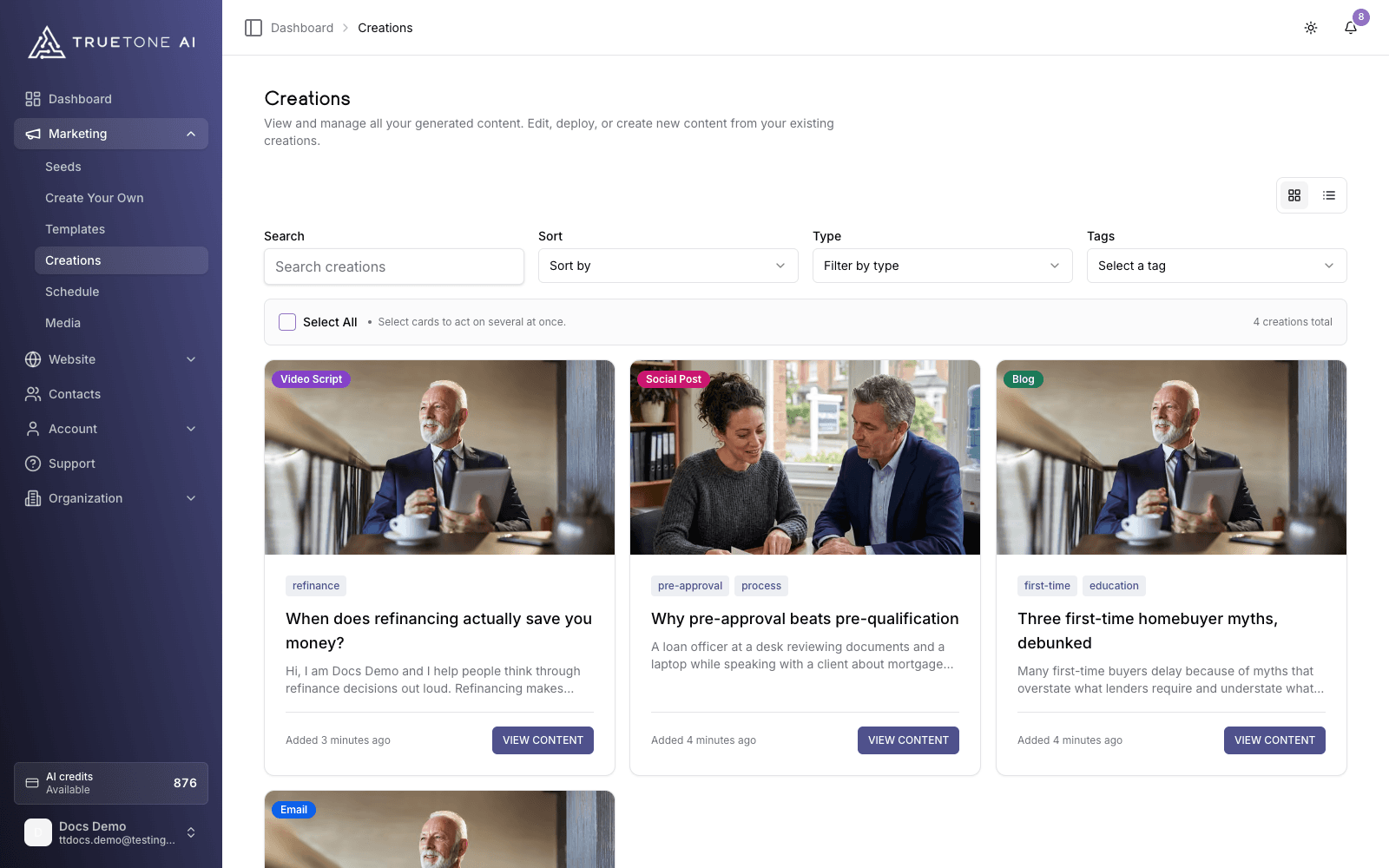
Creations is your library: every blog post, email, social post, video script, and audiogram you generate lands here, ready to open, refine, and then export, publish, or schedule.
What it is
Content that comes out of the TrueTone System does not vanish after you generate it. It is saved to your Creations library, in your own private list. Nobody else on your team sees your drafts.
Every item is filed by Channel: Blog, Email, Social, Video, or Audiogram. You can search across all of them, filter by type or tag, sort them, and switch between a card grid and a list view. Open any item and you get its full content, the TrueTone Profile settings it was written with, its source seed (if it came from one), and a set of actions that fit that Channel.
The library is where a piece of content lives for its whole life: from the moment it is generated, through any edits or a full regenerate, to the day you export it, publish it, or schedule it to post.
Who it is for
You, the loan officer, use this every day. It is your home base between “I generated something” and “it is out in the world.” Your sales, marketing, and product teammates will also recognize it as the single surface that ties generation, refinement, and distribution together.
Finding a piece of content
The top of the library gives you four ways to narrow a long list:
| Control | What it does |
|---|---|
| Search | Matches text across your creations |
| Type | Shows one content type at a time: Blog, Email, Social, Video, Audiogram, or the read-only Marketing Asset |
| Tags | Filters to items carrying the tags you pick |
| Sort | Newest first, oldest first, A to Z, or Z to A |
A grid and list toggle sits above the results, and long lists are paged. Select one or more cards to reveal bulk actions: Export (downloads the selected items as a JSON file), Manage Tags (add or remove tags across everything selected), and Delete.
Opening, refining, and acting on a creation
Open it
Click View content on any card. The detail page shows the generated content, its details, and the TrueTone Profile settings behind it.
Edit in place
Depending on the Channel, you can adjust the piece directly: swap the image, edit video captions, tweak an audiogram, or work an email in the email builder. Unsaved edits are flagged so you remember to save before you act on them.
Regenerate to refine
Not quite right? Use Regenerate. Adjust the TrueTone Profile settings and produce a fresh version in your voice, watch it stream in, then apply it when you are happy.
Export, publish, or schedule
Each Channel offers the actions that make sense for it (see below). This is where the content leaves the library.
What each Channel lets you do
Blog
Publish the post straight to your website, or schedule it to publish later. Because your site has no draft layer, publishing is instantly live. Once it is live you can share it to social, push or export it to your CRM, and view it on your website. You can also add an audio version read in your own voice; it uses credits from your allowance and appears on your site when it is ready.
Good to know
Every creation carries the TrueTone Profile settings it was made with. Regenerating lets you change those settings and try again without starting from scratch.
Deleting a creation is permanent. Single and bulk deletes both ask you to confirm, and there is no undo.
You may also see read-only Marketing Asset items in the library. These are a render history: you can view or download them, but they cannot be edited, tagged, scheduled, or deleted the way the five Channels can.