Local search
Tell TrueTone where you lend. It weaves your market into your website’s page titles, meta descriptions, and the structured data search engines read, so when a borrower in your area searches for a lender, your site is built to be found.
What it is
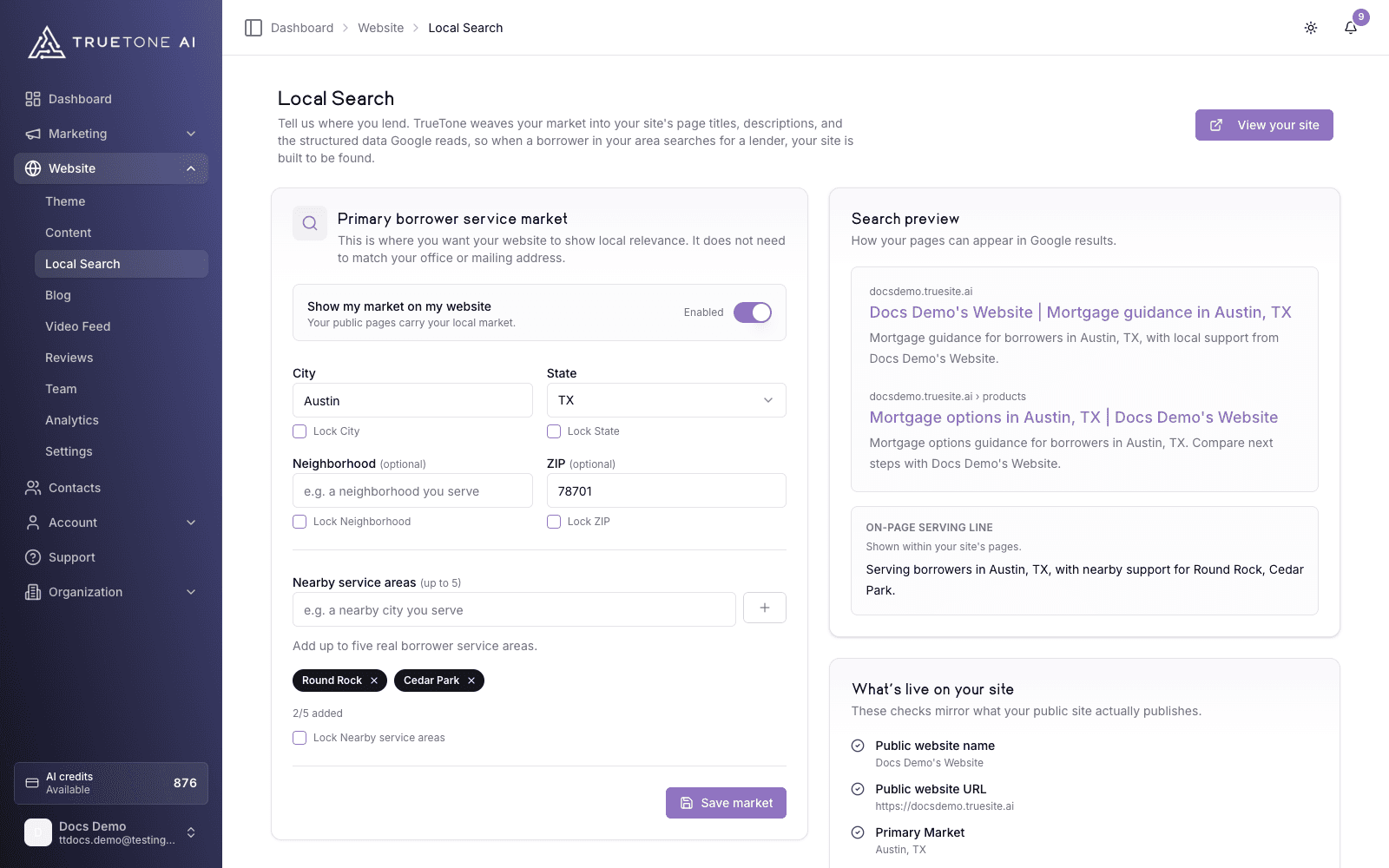
Local Search is the part of your website settings where you name the market you serve. You enter a primary borrower service market (a city and state) and, if it fits, a neighborhood, a ZIP, and up to five nearby service areas. TrueTone takes that market and puts it to work across your public site.
Three things happen with what you save. Your page titles and meta descriptions pick up your city and state, so a search result reads like a local lender instead of a generic one. Your pages carry an on-page serving line (“Serving borrowers in your city, state”). And your site publishes structured data, the machine-readable description in JSON-LD that search engines use to understand that you are a mortgage business serving a specific place.
You are not editing raw code or SEO tags. You fill in a short form, watch a live search preview update, and flip one switch to publish. A checklist on the same screen mirrors exactly what your public site is putting out, so there is no guessing about what is live.
Your primary market is about relevance, not your address. It is where you want to show local strength, and it does not need to match your office or mailing address.
Who it is for
Any loan officer who wants borrowers in their area to find their website in search. It is built for the person who knows the towns they serve but does not want to touch meta tags, schema markup, or SEO settings by hand. Sales, marketing, and product teams reference this page to understand what Local Search actually publishes and where its limits are.
How it works
Set your primary borrower service market
Enter the city and state you want to be found in. City and state are required. A neighborhood and a ZIP are optional and only worth adding if they reflect real coverage. Place names typed in all caps or all lowercase are cleaned up automatically, so VIRGINIA BEACH publishes as Virginia Beach.
Add nearby service areas
List up to five nearby markets you genuinely serve. These add supporting local context without stuffing your primary market. If a nearby area just repeats your primary city, TrueTone flags it so your metadata stays clean.
Check the search preview
The preview shows how your home page and a mortgage-options page could appear in a search result: the site address, the title, and the description. It also shows the on-page serving line that appears within your site. This updates as you type, before anything is public.
Save your market
Press Save market. Your market is stored, and the eligibility checklist updates to reflect it. Saving does not make anything public on its own.
Turn on public output
Flip Show my market on my website to publish. The switch stays disabled until you have saved a market, so publishing always follows a save. Because your website is a hosted site with no draft layer, this is live for visitors right away. Turn it off and your public pages return to their baseline metadata.
What publishes to your site
The “What’s live on your site” panel mirrors what your public site actually emits. Structured data stays off until every required check passes. Contact details are recommended: they enrich your structured data but never block it.
| Check | Required | What it means |
|---|---|---|
| Public website name | Yes | Your site has a visible name. |
| Public website URL | Yes | Your site has a subdomain or verified domain. |
| Primary Market | Yes | A city and state are saved. |
| Search Presence enabled | Yes | The public output switch is on. |
| Visible contact method | Recommended | A visible email or phone enriches your structured data. |
When all four required checks are green (the fourth being public output turned on), your site publishes local business structured data in JSON-LD. Until then, your pages stay on baseline metadata and no structured data is emitted.
Good to know
There is no draft layer on your public website. The moment you turn on Show my market on my website, your local titles, descriptions, and structured data are live for visitors and search engines. Turning the switch off reverts your public pages to baseline metadata.
A few honest limits worth knowing:
- Local Search shapes how your site is built to be found. It does not guarantee a search ranking, and it is not a live tie-in to Google Search Console or any search dashboard.
- Nearby service areas are capped at five, and duplicates or areas that repeat your primary market are flagged to keep your metadata from looking keyword-stuffed.
- A neighborhood and ZIP are optional. If you leave all of the extra context blank, TrueTone suggests adding real coverage detail, but your primary city and state still publish.
Enterprise note: an organization admin can lock individual fields (City, State, Neighborhood, ZIP, or Nearby service areas). A locked field shows as Managed and is read-only for the loan officer, so a market an organization has standardized stays consistent across its seats.