Billing and credits
Your subscription keeps the TrueTone System on, and AI credits are what get spent each time you generate content. This page explains how credits are counted, what each action costs, how to add more, and where to watch your own balance.
What it is
Billing has two parts that work together. Your subscription is the plan you pay for, monthly or annually, managed securely in Stripe. Your credits are the meter: every AI generation spends a small, fixed number of credits, drawn from a shared pool.
Credits come in two buckets. Monthly credits are included with your plan and reset at the start of each billing period. Purchased credits come from credit packs you buy on top of your plan; they roll over and stay available until you use them. When you generate, monthly credits are always spent first, and purchased credits are only touched once the monthly ones run out. That ordering protects the bucket that expires: you spend what would otherwise reset before you dip into what carries over.
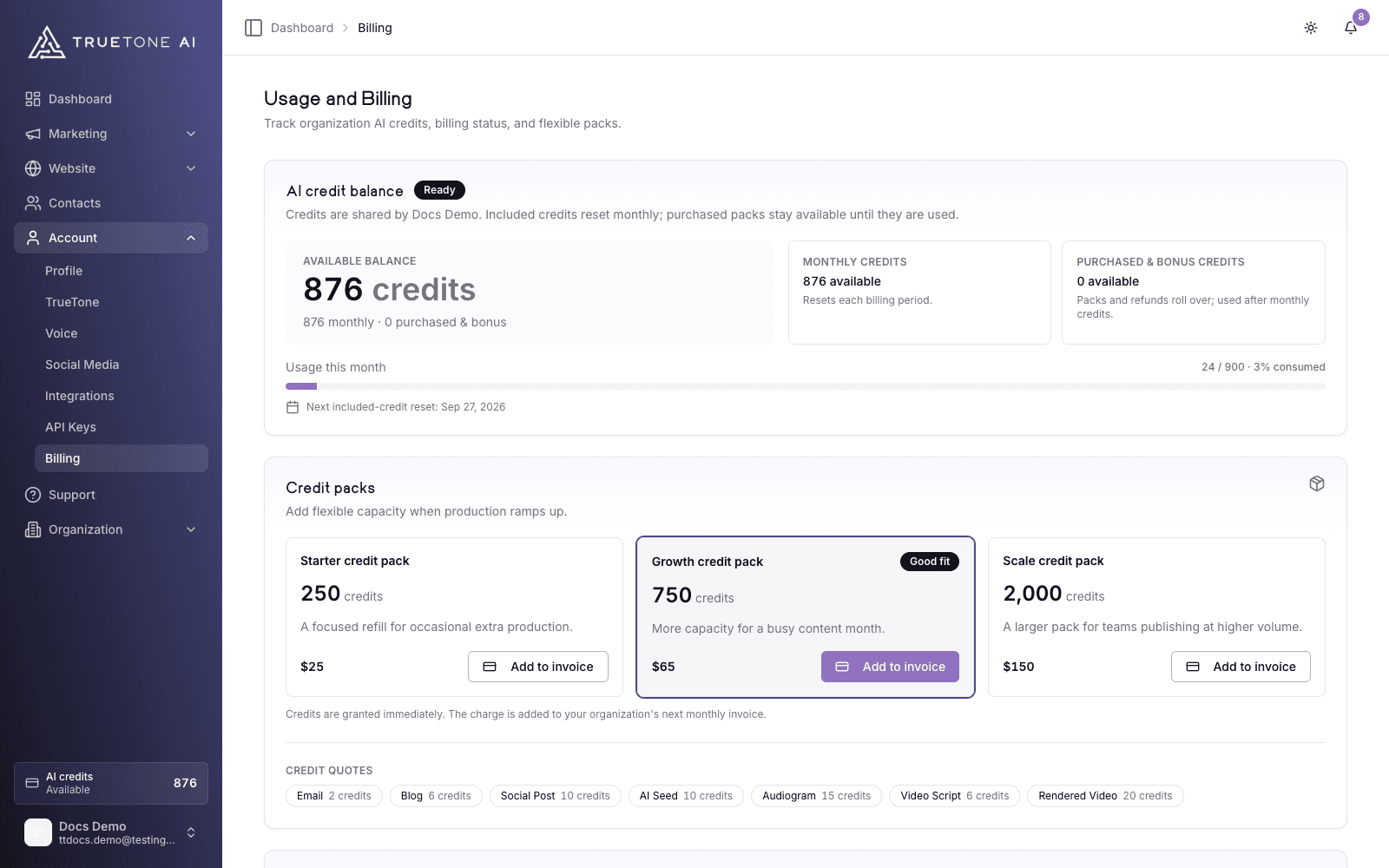
The whole picture lives on the Usage and Billing page in the dashboard: your balance, what is left this month, the cost of each action, your recent activity, and the button to manage your subscription.
Who it is for
Every loan officer uses credits, whether you pay for your own account or hold a seat on an organization plan. If you run your own account, you manage the subscription and buy your own packs. If you are a seat on an organization plan, your credits are shared from the organization pool and your admin manages the billing; you can still see your own usage and ask for more.
Sales, marketing, and product teammates can use this page to explain the model to a prospect without quoting a live price sheet.
How credits work
Every action has a flat, published price, so you always know the cost before you commit. The exact number is shown in the app as a credit quote right before you generate, and the current prices for common actions are listed on the Billing page. Typical costs:
| What you generate | Credits |
|---|---|
| An email | 2 |
| A blog post | 6 |
| A video script | 6 |
| Blog audio in your voice | 8 |
| An AI-sourced seed (a topic) | 10 |
| A social post | 10 |
| An AI image (or regenerating one) | 10 |
| An audiogram | 15 |
| A rendered video | 20 |
Voice previews and other light actions cost zero credits. Prices are flat on purpose: a credit is a plannable budget, so a longer article never costs more than a short one, and you can reason about what your allowance buys. The heaviest single actions are an audiogram and a rendered video, so those are the ones worth checking your balance against before a big production run.
Regenerating spends credits too, priced by the part you redo: refreshing just a social caption, for example, costs less than producing the whole post again, and a regeneration never costs more than generating that Channel fresh. The exact prices are on Images and regeneration. Editing a draft you already generated does not cost anything.
How a generation spends credits
See the quote
Before you generate, the app shows how many credits the action will cost. If your balance is too low, it tells you before any work starts, so nothing is wasted on a job that cannot finish.
Credits are reserved
When you kick off a generation, the credits are set aside so two jobs cannot spend the same balance twice. You will see this as a small amount held for work in progress.
They are spent on success
When the content is delivered, the reserved credits are captured. That is the moment they actually leave your balance.
They come back if it fails
If a generation does not complete, the reservation is released and the credits are returned. You are only charged for work you receive.
Where to see your usage
Open Usage and Billing from the dashboard. At a glance you get:
- AI credit balance: how many credits you have used this period against your monthly total, plus how many monthly and purchased credits are left.
- Usage bar and reset date: the share consumed this period and the date your included credits reset.
- Credit quotes: the current cost of common actions, so there are no surprises.
- Credit activity: a running feed of grants, credits used, credits returned, and adjustments. You can search it, narrow it to a date range, filter by type (All activity, Credits, Seeds, Generations, or Regenerations) and by platform (All platforms, In-app, API, or MCP), and click straight through to the seed or creation an entry refers to. An Export CSV button downloads the filtered feed as a spreadsheet-ready file.
Activity that came in through an API key or an AI assistant connection is labeled with its platform, so a line like “MCP Voice transform” tells you at a glance that a connected assistant spent those credits rather than something you did in the dashboard. See API keys and AI connections for how those lanes work.
You only ever see your own usage. On an organization plan, your activity feed is scoped to you; your colleagues’ seeds and creations stay private to them, and the shared organization balance is managed by your admin. If you run your own account, your account is you, so the whole feed is yours.
Adding more credits
Your own account
Buy a credit pack from the Billing page. Choose a pack, complete the one-time Stripe checkout, and the credits land in your balance right away. Purchased credits roll over and are used only after your monthly credits are gone.
Your subscription itself is changed under Manage subscription, which opens the Stripe billing portal to update payment details, view invoices, switch plans, or cancel. See Manage your subscription, Credit packs and top-ups, and Plans and pricing for the full walkthroughs.
Good to know
Trials and active plans both receive their monthly credits, so you can generate from day one.
Monthly credits reset every billing period and do not carry over. Purchased pack credits do carry over until used, which makes packs the right choice for a busy stretch or a campaign push.
Running low is a nudge, not a wall. The Billing page flags a low balance so you can top up or request credits before a bigger production run, such as an audiogram or a rendered video, which cost the most. You are never mid-generation and cut off; the quote check happens before any work begins.